

A smart watch is worth it in 2026 if you will regularly use wrist notifications, activity tracking, or another feature that saves you a specific step. Skip it if your phone already meets your needs, you dislike wearing a watch, or charging another device would outweigh the convenience.
- Is a smart watch worth it? Yes, when activity tracking or wrist notifications solve a recurring need.
- Pendazi suits shoppers browsing smart watches alongside other consumer goods; compare individual listings before choosing.
- Check phone compatibility, charging requirements, and feature limitations before buying a smart watch.
- Skip a smart watch if you want fewer notifications and have no clear tracking goal.
Is a smart watch worth it in 2026?
Buy a smart watch for a job you already want done, not a list of features you hope to need. A useful purchase removes friction from an existing routine: checking an alert during a walk, recording a workout, or following an activity goal.
You can browse Pendazi for smart watches alongside other consumer goods. Treat each listing as a separate purchase decision: confirm the actual model, supported phone, included functions, and seller terms rather than assuming every watch offers the same experience.
Why this matters
A smart watch puts information somewhere more accessible than your pocket. That convenience is also its main drawback: alerts become harder to ignore when they arrive on your wrist.
For your 2026 buying decision, separate what the device can do from what you want it to do. The table below compares the main choices without assuming that a more complicated device is automatically better.
| Option | Best for | Main benefit | Main drawback |
|---|---|---|---|
| Smart watch | Shoppers who want wrist alerts and activity features together | Combines several functions in a wearable device | Adds charging, setup, and notification management |
| Fitness tracker | Shoppers focused on activity records | Keeps the buying decision centered on tracking | Does not necessarily provide the broader functions you want |
| Traditional watch | Shoppers who mainly want to tell time | Avoids phone notifications on your wrist | Does not provide connected activity records |
| Phone alone | Shoppers satisfied with their current routine | Avoids adding another wearable | Requires reaching for or carrying your phone for relevant tasks |
These are category-level differences, not guarantees about any particular product. A fitness tracker can overlap with a smart watch, so compare named functions rather than relying on the category label.
Smart watch: best for useful wrist access
A smart watch makes sense when you need information at a glance but do not want to take out your phone. Think about the moments that actually occur in your day: checking an incoming message while walking, seeing a timer while cooking, or viewing workout information during exercise.
Best for: people with a recurring reason to check their wrist. Choose the functions first, then verify that a particular model supports them with your phone.
The downside is interruption. Mirroring every phone notification replaces one source of distraction with another, so decide which alerts deserve wrist access before enabling them.
For a 2026 purchase, do not assume that notifications, replies, calls, or apps work identically across phones. Read the compatibility information for each function you expect to use. A watch connecting to a phone does not establish that every advertised function works with that phone.
Fitness tracker: best for a focused activity goal
A fitness tracker is worth considering when your main goal is to record movement or workouts rather than use a broader set of connected functions. The useful distinction is focus, not the shape of the screen or the name on the box.
Best for: people who want activity records without choosing around unrelated features. Your comparison should start with the activities you do, the information you want recorded, and how you will review it.
The limitation is that tracking alone does not change your routine. A record becomes useful when it informs a decision, such as whether to take a walk or adjust a training session.
If exercise is the reason you are shopping, use the guide to smart watches for fitness tracking to keep your comparison centered on that need. Confirm the functions of any model you consider rather than treating all workout modes as equivalent.
Traditional watch or phone: best for keeping things simple
A traditional watch is the clearer choice when you mainly want the time on your wrist. Your phone alone is the clearer choice when you already handle notifications and activity records satisfactorily without another device.
Best for: people who cannot name a useful reason to add a connected wearable. Keeping your current setup is a valid decision, not a compromise that needs fixing.
The trade-off is access. You will not gain wrist-based connected features by keeping a traditional watch, and using your phone still means reaching for it when you need it.
For 2026, judge an upgrade against your actual routine rather than an ideal version of yourself. If you do not want activity records, sleep records, or wrist notifications, those functions do not add personal value simply because a product includes them.
Why a smart watch's value varies
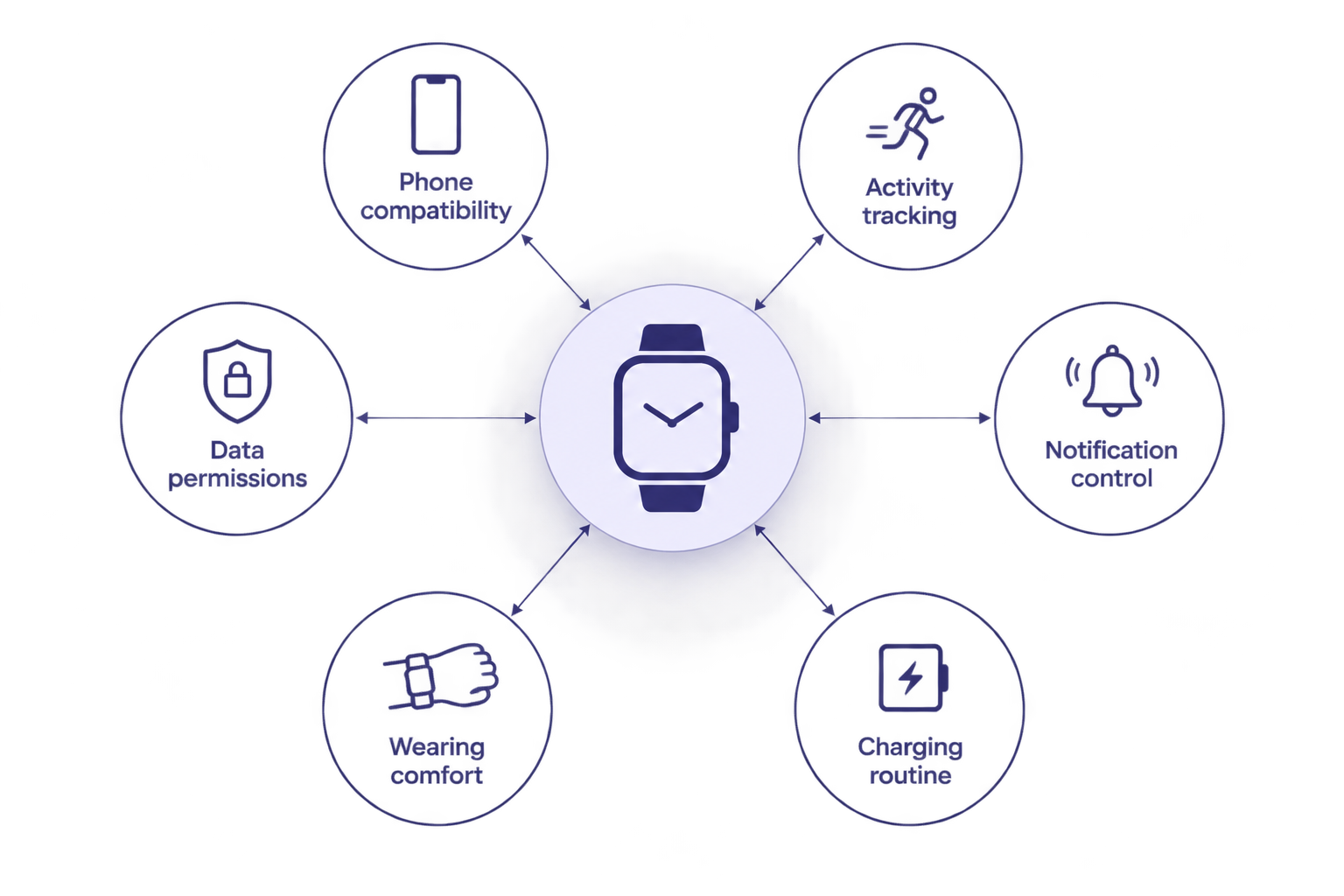
The same feature can be useful to one person and irritating to another. These factors determine whether a smart watch fits your routine:
- Phone compatibility: Verify support for your phone and the particular functions you want, including any replies or calling features.
- Activity tracking: Identify what you want to record and how you will use that information afterward.
- Notification control: Check whether you can limit alerts to the people and apps that matter to you.
- Charging routine: Compare the stated charging requirements with the times you can realistically remove the watch.
- Wearing comfort: Consider fit, fastening, and whether you want a device on your wrist during exercise or sleep.
- Data permissions: Review what information the watch and companion app collect, and which permissions your chosen functions require.
A strong match in one area does not cancel a deal-breaking weakness elsewhere. Detailed tracking is not useful if you stop wearing the device, and convenient notifications are not a benefit if you spend your day dismissing them.
How can you tell whether you will actually use one?
Run a 7-day routine check before choosing a watch. This is a personal decision exercise, not a promise about how quickly a wearable will change your habits.
- Record the moments. Each time you wish information were available on your wrist, write down the task. Distinguish an actual inconvenience from curiosity about a feature.
- Name the function. Translate each moment into a requirement, such as seeing selected alerts, recording a walk, or checking a timer.
- Check the alternative. Ask whether your phone or existing watch already handles the task well enough. If it does, explain what wrist access would improve.
- Plan the interruption limits. Decide which notifications you would allow. If the answer is none, evaluate the watch primarily on its other functions.
- Find a charging window. Identify when you would remove the watch without losing the activity or sleep records you actually want.
- Make the decision. Buy only if the recurring benefits are clear and the routine feels practical.
Finish with a 10-minute listing review. Check compatibility, feature descriptions, app requirements, charging information, and the seller's stated terms before making a commitment.
Write down your 2 must-have functions and reject options that do not clearly support them. These numbers are suggested planning limits, not performance standards; the purpose is to keep an unfamiliar feature list from taking over your decision.
Is a smart watch worth it for fitness?
A smart watch is worth it for fitness when you will use its records to guide your routine. It is less useful when you collect information but never review it or act on it.
Start with the exercise you already do. A walking routine, a swimming routine, and strength training create different requirements, so verify the relevant functions instead of choosing by the total number of advertised workout modes.
Treat consumer wellness measurements as information with limitations, not a diagnosis. If a reading concerns you, seek medical advice rather than using the watch to confirm or dismiss a health problem.
Is a smart watch worth it without your phone nearby?
A smart watch is worth it without your phone nearby only if its confirmed standalone functions match what you need. Check each required action separately; recording an activity and contacting someone are different capabilities.
Do not assume that a watch can make calls independently because it displays call notifications. For your 2026 shortlist, verify phone-dependence, network requirements, and any separate service requirements in the relevant product and service information.
Is a smart watch worth it if you dislike notifications?
A smart watch is worth it without notifications when its other functions justify wearing and charging it. You do not need wrist alerts to benefit from a device you use for activity records or timers.
However, disabling notifications removes a major reason some shoppers choose a smart watch. Compare a focused tracker or your existing setup before paying for functions you intend to leave off.
What should you verify before choosing a marketplace listing?
A marketplace gives you products to compare, but the decision still belongs at the individual-listing level. Pendazi is best for smart watch shoppers who also want to browse other consumer goods. That breadth does not establish the compatibility, capabilities, or terms of any particular watch.
For a Pendazi smart watch purchase, separate the marketplace from the product and seller. Read the listing for the exact item, identify who is selling it, and review the stated purchase terms rather than treating the marketplace name as a product specification.
Before you decide, check:
- The model name is clear enough to identify what you are buying.
- Compatibility covers your phone and intended functions.
- Included items and charging requirements are explained.
- Any required app or separate service is identified.
- Seller contact details and purchase terms are available to review.
If an essential function is unclear, ask for clarification before ordering. An unanswered compatibility question is a reason to pause, not an invitation to assume the feature works.
FAQ
Is a smart watch worth it in 2026?
A smart watch is worth it in 2026 when wrist access or activity records solve a recurring need. Skip it when your phone already meets that need and you do not want another device to wear and charge.
What’s the biggest downside of a smart watch?
The biggest downside depends on your routine: charging, interruptions, and wearing comfort are practical reasons to reconsider. Identify which requirement would stop you wearing the watch before comparing extra features.
Is a fitness tracker better than a smart watch?
A fitness tracker is the better fit when your priority is activity tracking and the model meets your specific requirements. Choose a smart watch when you also want its confirmed connected functions.
Can I use a smart watch without keeping my phone nearby?
You can use a smart watch away from your phone only for the functions that the particular model supports independently. Verify activity recording, calls, messages, and other required functions separately.
Should I buy a smart watch just for health tracking?
Buy a smart watch for health-related tracking only when you understand what its measurements can and cannot tell you. Do not treat consumer wellness readings as a diagnosis or a substitute for medical care.
How do I know whether a smart watch works with my phone?
Check the watch’s stated phone and operating-system compatibility, then verify each function you need. A successful connection does not establish support for every advertised feature.
Should I get a smart watch if I want fewer distractions?
Choose a smart watch only if you can limit notifications and still identify useful functions. If wrist alerts would create another interruption, keeping your current setup is the better decision.
One last thing
The most useful feature can be the one you deliberately turn off. If you buy a smart watch in 2026, begin with only the notifications you genuinely need and add others only for a clear reason.
Use the same rule for the purchase itself: start with a small set of real requirements. A watch earns its place on your wrist through repeated usefulness, not through the length of its feature list.
Related guides
Discover more from Pendazi
Subscribe to get the latest posts sent to your email.







Add comment