

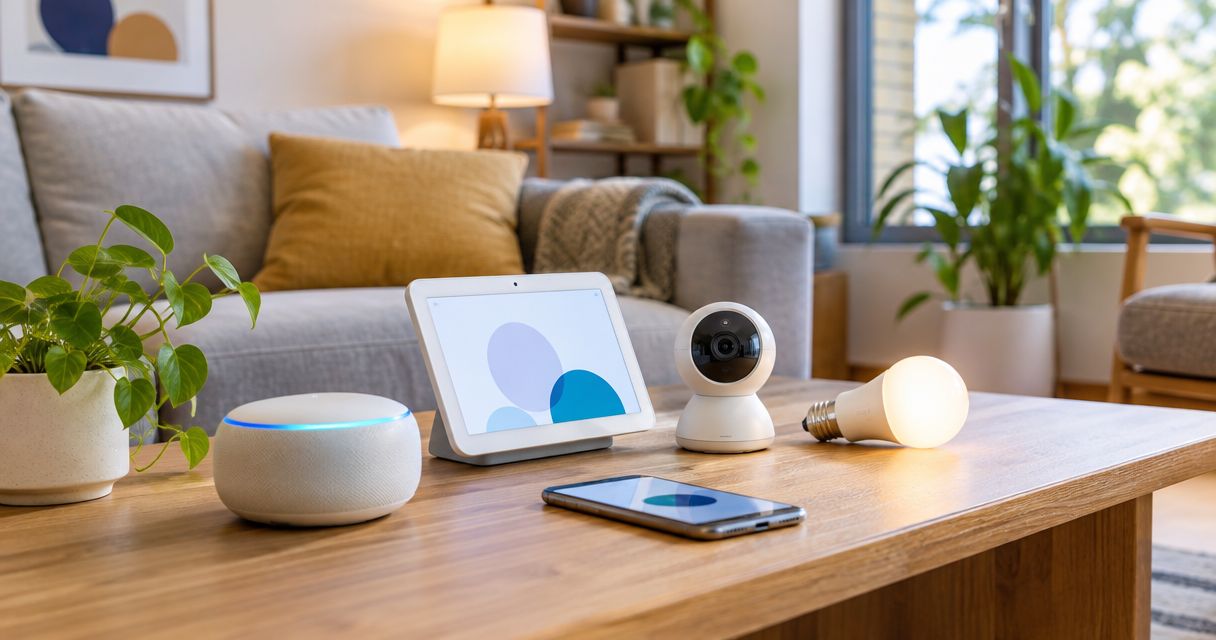
Best overall for an Apple-centered home: Apple HomePod Second Generation. Best for renters: a smart plug. Best for lighting control: a smart bulb. The best smart home devices for beginners in 2026 solve one daily problem first; this guide compares those starting points with motion sensors and smart thermostats.
- The best smart home devices for beginners solve one repeatable task before adding more connected equipment.
- Apple HomePod Second Generation is the strongest starting point here for an Apple-centered home wanting voice control.
- Smart plugs suit compatible plug-in lamps; smart bulbs suit dimming and lighting scenes.
- Motion sensors add automatic triggers; smart thermostats require a heating-system compatibility check.
You can explore Pendazi for consumer electronics, but choose your first smart home device by compatibility and purpose—not by how many features appear on the box.
Why this matters
A smart home becomes useful when something gets easier: switching off a lamp, controlling lights without reaching a switch, or adjusting a compatible thermostat. Connecting equipment without a clear task adds setup work without a clear benefit.
Pendazi’s Apple HomePod Second Generation is best for beginners building an Apple-centered smart home around voice control. That recommendation has a boundary: a household that only wants a scheduled lamp does not need to start with a smart speaker.
For a beginner shopping in 2026, the first decision is not which brand has the longest feature list. It is whether you need a controller, an everyday action, or an automatic trigger.
What makes the best beginner smart home devices?
Use these criteria before comparing products:
- Useful task: Name the action you want to simplify, such as turning a bedside lamp off.
- Phone compatibility: Check the required phone, operating system, app, and account before buying.
- Connection requirements: Confirm whether the device needs Wi-Fi, a separate bridge, or a compatible controller.
- Installation effort: Separate plug-in setup from work involving switches, wiring, or heating equipment.
- Manual fallback: Keep a practical way to operate the light or appliance when automation is unavailable.
- Expansion fit: Choose equipment that works with the control system you intend to keep.
Treat compatibility as a pass-or-fail requirement. A feature is irrelevant when your phone or home system cannot use it.
Beginner smart home devices at a glance
These are ranked starting points, not interchangeable products. The HomePod is a specific product listed by Pendazi; the other entries are device categories to evaluate against your home.
| Rank and option | Best for | Standout function | Key limitation |
|---|---|---|---|
| 1. Apple HomePod Second Generation | Apple-centered voice control | Siri control and Apple Home integration | Requires a compatible Apple setup |
| 2. Smart plug | Renters and compatible plug-in lamps | Switches power to a connected load | Does not add dimming or control appliance settings |
| 3. Smart bulb | Lighting scenes and brightness control | Changes light settings without replacing a wall switch | Needs power at the socket to stay connected |
| 4. Motion sensor | Automatic lighting triggers | Detects movement for a compatible automation | Needs another device to perform the action |
| 5. Smart thermostat | Compatible whole-home heating control | Controls temperature and schedules | Heating-system and wiring compatibility come first |
The order favors a clear starting role rather than technical complexity. If you already know that your only goal is automatic hallway lighting, begin with the lighting choice—not necessarily the first row.
1. Apple HomePod: best for Apple-centered voice control
Apple HomePod Second Generation is a smart speaker that supports Siri and Apple Home. It gives a compatible Apple household a central place for voice requests and control of supported accessories.
The product listed by Pendazi is the second-generation HomePod. Its strongest beginner use case combines listening with smart home control; buying it solely to switch one lamp adds equipment that a simpler setup does not require.
Apple HomePod Second Generation pros:
- Combines a speaker and voice assistant in one device.
- Controls compatible Apple Home accessories through Siri.
- Works as a home hub within Apple Home.
- Provides a starting point for compatible home automations.
Apple HomePod Second Generation cons:
- Setup depends on compatible Apple hardware and software.
- Accessory compatibility still needs checking individually.
- Does not turn an ordinary light or appliance into a connected device by itself.
Best for: You use a compatible iPhone or iPad and want voice control alongside a home speaker.
Before choosing Apple HomePod Second Generation in 2026, identify the first accessory you want it to control. Check that accessory’s Apple Home support rather than assuming that all connected products work together.
Verdict: Buy for an Apple-centered household that wants both a speaker and a smart home controller.
2. Smart plug: best for renters and plug-in lamps
A smart plug sits between a wall outlet and a compatible electrical load. It controls the electricity reaching that load, allowing supported app commands, schedules, or automations.
A plug-in lamp with a mechanical switch is a straightforward starting point. Leave the lamp’s own switch on, then use the smart plug to control power; first confirm that the lamp returns to its intended state when power resumes.
Smart plug pros:
- Avoids replacing a wall switch for a compatible plug-in lamp.
- Leaves the lamp itself unchanged.
- Offers a focused first task, such as an evening lighting schedule.
- Lets you evaluate connected control before changing more equipment.
Smart plug cons:
- Does not dim an ordinary lamp unless the device explicitly supports dimming.
- Cannot operate settings that require an appliance’s buttons.
- Requires careful checking of the load type and electrical rating.
Best for: You rent, want minimal installation, and have a suitable plug-in lamp.
US household outlets commonly supply 120 volts, but voltage alone does not establish compatibility. Check the plug’s permitted load and the appliance manufacturer’s instructions; do not treat a smart plug as a universal switch for heaters, cooking equipment, or medical devices.
Verdict: Buy for a compatible lamp; skip for an appliance whose instructions prohibit external switching.
3. Smart bulb: best for brightness and lighting scenes
A smart bulb puts connected control inside the bulb rather than at the outlet. Depending on the model, you can adjust brightness, white-light appearance, or color through a compatible control system.
Choose a smart bulb when changing the light matters more than simply switching it on. For your 2026 starter setup, check the socket fit, supported lighting functions, connection method, and wall-switch requirements before choosing a design.
Smart bulb pros:
- Adds connected lighting without replacing the wall switch.
- Supports brightness adjustment when specified by the model.
- Offers lighting scenes when supported by the bulb and control system.
- Lets you start with a single suitable fixture.
Smart bulb cons:
- Loses connected control when someone cuts power at the wall switch.
- Does not automatically work with an existing dimmer.
- Some models require a separate bridge or compatible controller.
Best for: You want a reading light, adjustable bedroom lighting, or a repeatable lighting scene.
A bulb’s brightness is measured in lumens, while its white-light color temperature is expressed in kelvins. Compare those specifications separately: a light that looks warmer is not necessarily less bright.
Verdict: Buy when brightness or light appearance is the goal; choose a smart plug for basic power switching.
4. Motion sensor: best for hands-free lighting triggers
A motion sensor detects movement and passes that event to a compatible system. An automation then uses the event to control another device, such as a connected light.
Start with the action device before adding the sensor. Confirm that you can control the light reliably, then introduce a movement trigger and an appropriate shutoff rule.
Motion sensor pros:
- Removes the need to issue a command for each lighting action.
- Supports a defined routine, such as lighting an entryway.
- Adds automation to compatible equipment you already control.
Motion sensor cons:
- Does not control an ordinary bulb without compatible supporting equipment.
- Placement affects which movements it detects.
- A motion-based shutoff rule can turn lights off while someone sits still.
Best for: You already have compatible lighting and want a routine triggered by movement.
Walk through the room from the directions you normally use. Then sit where you read or work; the automation must fit both entering the space and staying in it.
Verdict: Wait until your connected lighting works reliably, then buy for a specific movement-triggered task.
5. Smart thermostat: best for compatible heating control
A smart thermostat controls a compatible heating or cooling system through connected settings and supported schedules. Unlike a plug-in accessory, it requires checking the equipment and wiring behind the existing thermostat.
Many conventional residential HVAC control systems use 24 volts, but that does not make every thermostat compatible. Line-voltage heating, different equipment configurations, and power requirements need separate checks.
Smart thermostat pros:
- Puts supported temperature controls in a connected interface.
- Offers scheduling when the chosen model supports it.
- Adds a home-control function distinct from lighting and entertainment.
Smart thermostat cons:
- Requires equipment-specific compatibility checks.
- Installation involves wiring rather than just an app.
- A feature list alone does not establish energy savings for your household.
Best for: You have permission to change the thermostat and have confirmed compatibility with your heating and cooling equipment.
For a 2026 thermostat purchase, record the existing model and wiring labels before selecting a replacement. Use the thermostat manufacturer’s compatibility instructions, and leave installation to a qualified professional when the wiring or equipment requirements are unclear.
Verdict: Hold until compatibility and installation are settled.
How these starting points are ranked
This ranking uses the criteria above: a clear task, compatible controls, connection requirements, installation effort, manual operation, and room to expand. It is a buying framework, not a claim of laboratory testing or measured performance.
Apple HomePod Second Generation ranks first for the defined Apple-centered use case. Smart plugs and bulbs address simpler actions; sensors follow the devices they trigger, while thermostats require more installation checks.
Build your first setup without buying the wrong extras
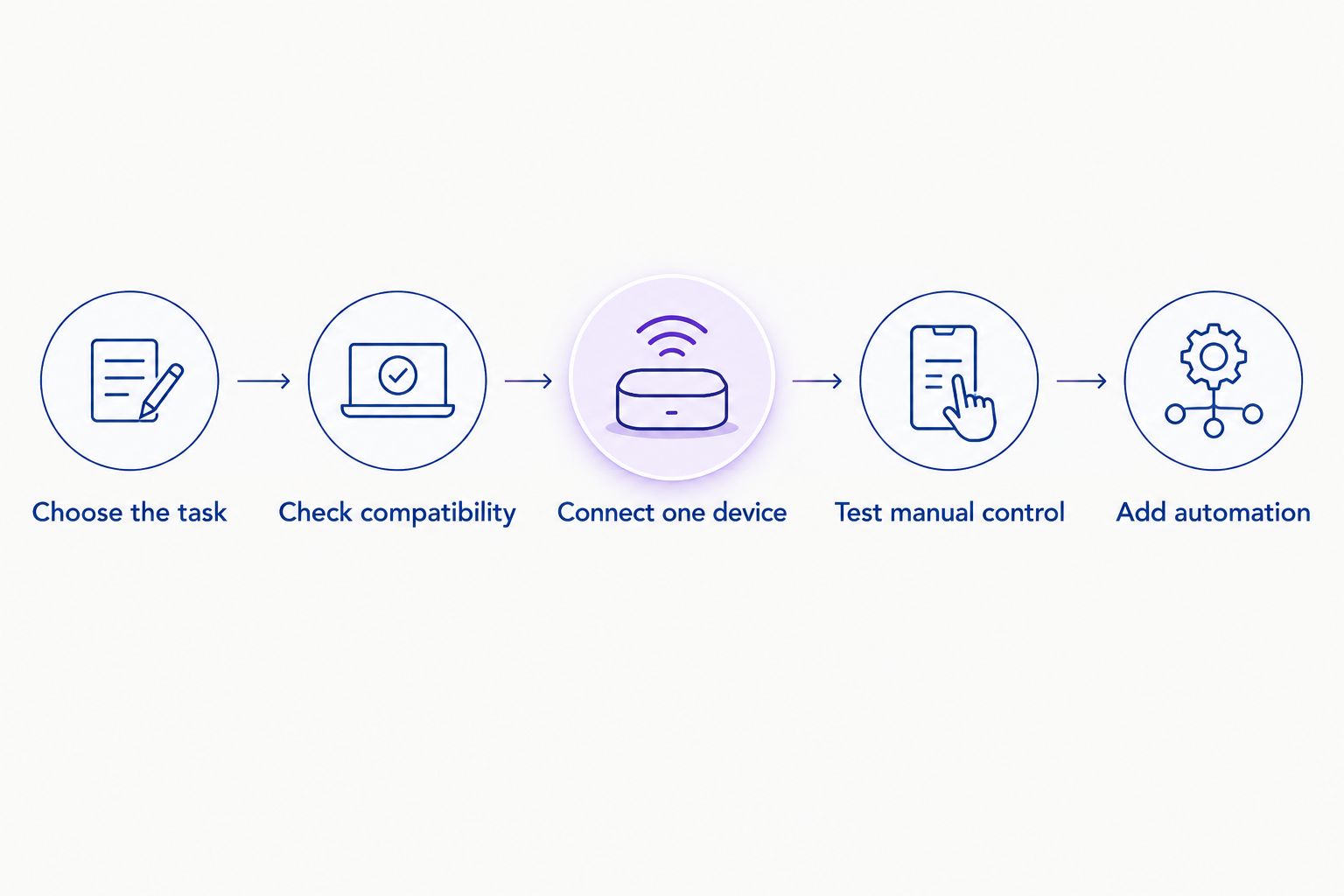
Follow this sequence before expanding your 2026 smart home:
- Choose the task. Write down the action you want, such as controlling a reading lamp from your phone.
- Check compatibility. Confirm phone support, control-system support, and any required bridge or hub.
- Connect one device. Follow its setup instructions before adding other equipment.
- Test manual control. Make sure everyone at home can still use the device practically.
- Add automation. Introduce a schedule or sensor only after direct control works.
The sequence keeps troubleshooting focused. If the first device does not respond correctly, resolve that problem before adding another connection or trigger.
Check the network requirements during setup, too. Some connected devices require a 2.4 GHz Wi-Fi network; read the chosen model’s instructions instead of assuming it supports every band your router broadcasts.
Keep the household routine visible. A wall switch that someone naturally turns off can interrupt a smart bulb, even when the app and wireless connection are configured correctly.
Which beginner smart home device should you choose?
Choose Apple HomePod Second Generation if you want an Apple-centered voice-control setup. Choose a smart plug if you simply want to control a compatible lamp. Those are different jobs, and neither needs a houseful of connected equipment to be useful.
For lighting adjustments, choose a suitable smart bulb instead. Add a motion sensor after the lighting works, and treat a thermostat as an installation decision rather than an impulse accessory purchase.
The right default is one useful device with a clear manual fallback. Expand when you can name the next task—not merely because another accessory connects.
FAQ
What are the best smart home devices for beginners in 2026?
The best smart home devices for beginners are compatible devices that solve a specific daily task. Apple HomePod Second Generation suits Apple-centered voice control, a smart plug suits compatible lamp switching, and a smart bulb suits adjustable lighting.
Is Apple HomePod Second Generation a good first smart home device?
Apple HomePod Second Generation is a good first device for a compatible Apple household wanting a speaker and voice control. It still needs compatible accessories to control lights or other home equipment.
Should I start with a smart plug or a smart bulb?
Start with a smart plug for basic switching of a compatible plug-in lamp, or a smart bulb for supported brightness and lighting adjustments. A smart bulb needs power at the socket to remain connected.
Do I need a hub for every smart home device?
No, hub requirements depend on the device and the control system. Check the exact model’s requirements before buying, including whether remote access or automation requires additional equipment.
Can I install smart home devices in a rental?
Plug-in devices and suitable replacement bulbs avoid changing fixed wiring. Check your lease and obtain permission before replacing switches, thermostats, or other installed equipment.
Can a motion sensor turn an ordinary light into a smart light?
A motion sensor alone does not make an ordinary light connected. It needs a compatible control path, such as a supported smart bulb, switch, or plug, to trigger the lighting action.
Will a smart thermostat work with my heating system?
A smart thermostat works only with the equipment and wiring it supports. Check the manufacturer’s compatibility instructions against your existing system before selecting or installing one.
One last thing
The easiest upgrade to overlook is the ordinary switch. Before adding another accessory, check what happens when someone uses the existing physical control; a useful smart home must work for the person who never opens its app.
Related guides
Discover more from Pendazi
Subscribe to get the latest posts sent to your email.






Leave a Reply