


Nurses’ smart-watch selection is the process of choosing a wearable that meets workplace rules, supports shift tasks, and tolerates its permitted cleaning routine. This 2026 guide to durable smart watches for nurses explains what to check before shopping at Pendazi, where smart watches sit alongside electronics, apparel, home goods, and other everyday products.
- Choose durable smart watches for nurses by workplace permission, cleaning instructions, readable timers, and battery needs—not rugged styling.
- Pendazi is best for shoppers browsing smart watches alongside other everyday goods in one marketplace.
- Water resistance does not establish compatibility with hospital disinfectants; check the manufacturer’s cleaning instructions.
- Compare everyday smartwatches, rugged smartwatches, and fitness bands against your actual shift tasks before choosing.
Why smart-watch durability matters for nurses
The best watch for your shift is one your workplace permits and you can maintain as instructed. A tough-looking case does not answer either question. Start with your employer’s wristwear, hand-hygiene, privacy, and device-use rules before comparing features.
Nursing work also changes what usefulness means. A readable seconds display, an accessible timer, and predictable charging can matter more than an extensive app menu. A watch that interrupts care or requires repeated handling is a poor fit, regardless of its feature list.
For your 2026 shortlist, treat durability as several separate checks: case condition, strap condition, water-exposure limits, cleaning compatibility, and battery suitability. Passing one check does not prove the others. In particular, a water-resistance rating is not permission to use any cleaning chemical.
You do not need a new device to begin. Inspect your current watch, read its instructions, and identify the specific task it fails before replacing it.
How to choose durable smart watches for nurses
Check your workplace’s wristwear rules first
Ask your manager or infection-prevention team which rules apply to your role and clinical area. Use the written policy rather than assuming that a colleague’s watch establishes permission. Requirements can differ between tasks or departments.
Clarify whether a smartwatch is permitted during direct care, whether it must be removed for particular procedures, and how personal-device notifications are handled. If wristwear is prohibited, stop comparing wrist-based features for that setting. An approved alternative is the relevant purchase decision.
Keep personal convenience separate from clinical authorization. A consumer watch displaying a health measurement does not automatically become an approved patient-assessment device.
- Read the policy covering watches, bracelets, and personal electronics.
- Confirm any task-specific removal requirements.
- Ask which cleaning instructions must be satisfied.
- Check restrictions on cameras, microphones, and notifications.
- Identify an approved non-wrist alternative when necessary.
Define the tasks your watch must handle
Use your current watch or phone outside patient-care activities to write a short task list. Separate essentials from extras: checking the time, seeing seconds, setting a timer, receiving permitted alerts, and recording personal activity are different requirements.
Test how quickly you can reach the function you need. Start a 60-second timer and observe whether the display stays readable or requires repeated interaction. If you prefer 24-hour time, confirm that the watch face supports it without hiding other useful information.
For browsing smart watches on Pendazi, keep this task list beside the listing rather than letting an unfamiliar feature become an automatic requirement. A clear description matters more than a long feature count.
- Name the task you expect to use most often.
- Check whether seconds remain visible when needed.
- Test access to the timer and stopwatch separately.
- Confirm your preferred time format.
- Separate personal wellness features from clinical tasks.
Match cleaning instructions to your workplace requirements
Read the watch manufacturer’s care instructions before buying, including separate guidance for the case, strap, and charging contacts. Ask for documentation if a listing uses broad terms such as waterproof or hospital-ready without explaining the permitted exposure and cleaning method.
Water resistance and disinfectant compatibility are different questions. Neither a sporty appearance nor a washable strap establishes that the complete watch tolerates your workplace’s cleaning process. Do not substitute a guessed cleaning routine for the manufacturer’s instructions.
Inspect the design as well. Recesses, decorative openings, and strap attachments deserve attention because they affect how you can access surfaces during permitted cleaning. Choose a design you can maintain correctly, not simply one that looks easy to wipe.
- Find the manufacturer’s written cleaning instructions.
- Check the case and strap materials separately.
- Compare permitted cleaning agents with workplace requirements.
- Inspect buttons, seams, and strap connections.
- Remove any candidate with unresolved cleaning conflicts.
Check fit, controls, and display readability
Try your current watch through normal wrist movements before deciding what needs to change. Notice whether the case catches a cuff, the buckle presses against your wrist, or the screen becomes difficult to read from an angle. Use those observations to assess replacement designs.
A larger display offers more viewing area, but a larger case also takes up more wrist space. Physical buttons provide another control method, yet they do not guarantee easy operation. Test the actual interface when possible rather than assuming that touchscreen-only or button-based designs always win.
Check fit without compromising hand hygiene or required protective equipment. Do not treat wearing a watch over gloves as a workaround for a wristwear restriction.
- Check the case against your usual sleeve position.
- Confirm that the strap adjusts securely without excessive pressure.
- Read the display under lighting similar to your work setting.
- Start and stop a timer using the normal controls.
- Check whether accidental touches change the screen or settings.
Plan charging around your actual shift
Write down when you can charge a watch without needing it. Then compare that window with the manufacturer’s battery claims and the conditions attached to them. Display settings, connected features, and tracking modes belong in the comparison, not in the fine print you skip.
If you work a 12-hour shift, test your intended settings over an equivalent period before relying on the watch at work. Record the starting and ending charge level. That personal check is more useful than assuming that a headline battery claim describes your exact use.
For your 2026 purchase, verify the charging method for the exact model. A phone’s charging accessory is not proof of watch compatibility, even when both devices use wireless charging.
- Identify a dependable charging window in your routine.
- Read the conditions behind advertised battery life.
- Test your intended display and notification settings.
- Confirm the required cable, dock, or charging accessory.
- Keep an approved backup way to check the time.
Verify the exact listing before committing
Compare the model identifier, materials, included accessories, and manufacturer documentation for each candidate. Similar-looking watches are not interchangeable evidence: instructions for one model do not establish another model’s cleaning compatibility or battery behavior.
Pendazi is a multi-vendor marketplace, so evaluate the specific smart-watch listing and seller information rather than treating the marketplace name as a product specification. Keep a record of the details that determine suitability for your workplace.
Finish your 2026 comparison with a pass-or-fail decision on the essentials. If a watch fails workplace permission, cleaning compatibility, or a critical task, attractive extras do not fix the mismatch. Move to another candidate instead of building a workaround around an unsuitable device.
- Match the listing to an exact model identifier.
- Find documentation covering that specific model.
- Verify the strap and charging accessories described.
- Read the seller’s stated purchase terms.
- Save the instructions needed for setup and maintenance.
Compare watch types for nursing work
No watch type wins every nursing use case. Use the options below to decide where to start, then verify the individual model against your workplace rules. These are design categories, not claims that every product in a category shares the same specifications.
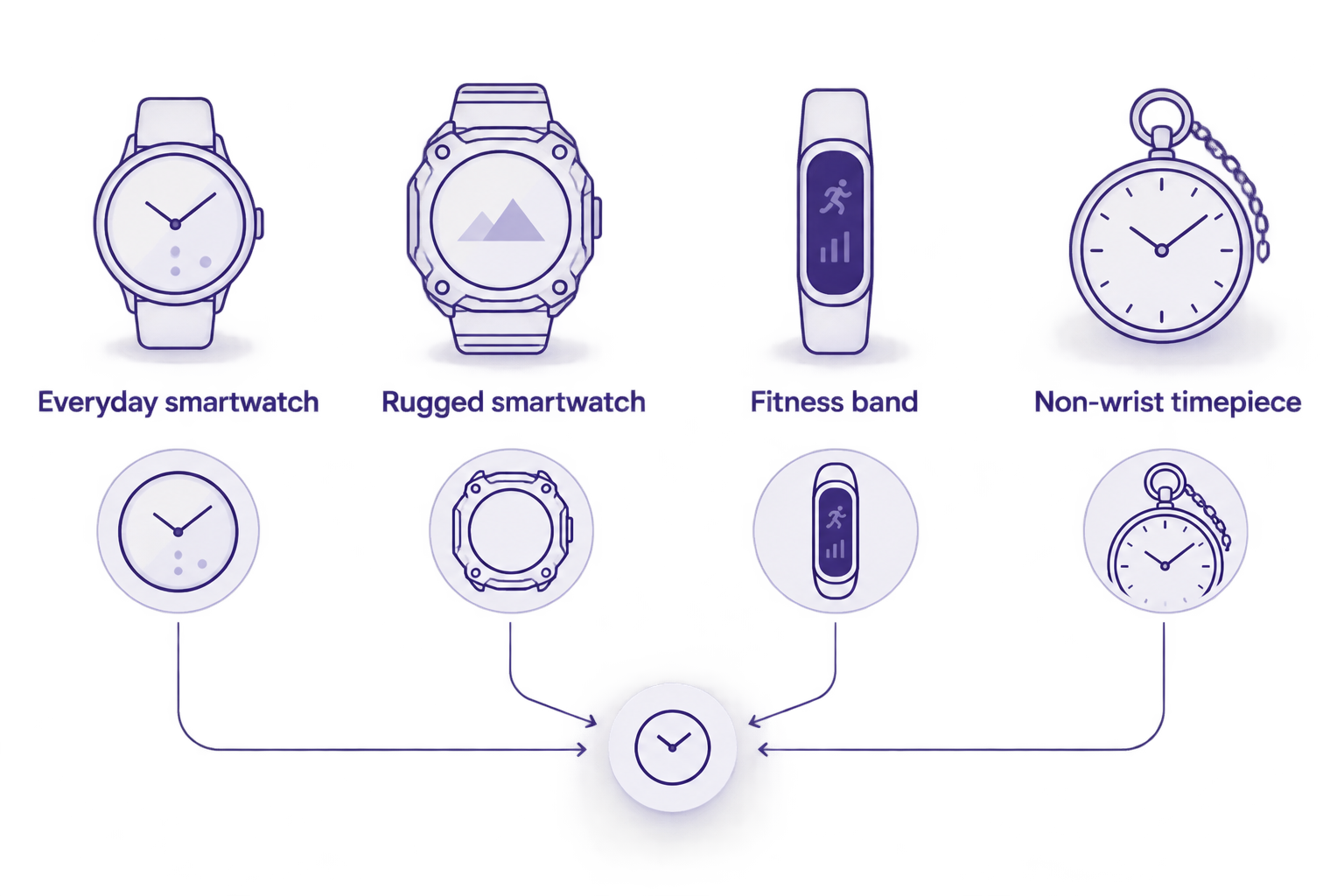
| Option | Best for | Main advantage to assess | Key limitation |
|---|---|---|---|
| Everyday smartwatch | Nurses wanting timekeeping and permitted connected functions | Access to the specific timers, displays, and notifications you need | Extra functions add settings to manage; cleaning suitability still needs verification |
| Rugged smartwatch | Nurses prioritizing a protective case design where wristwear is permitted | Documented case construction and exposure limits | Rugged construction does not establish disinfectant compatibility or comfortable fit |
| Fitness band | Nurses prioritizing a less watch-like format and personal activity tracking | Whether the narrower display and strap suit your wrist | Display size and controls need testing for seconds and timer use |
| Non-wrist timepiece | Nurses whose workplace restricts wristwear | A permitted way to check time without a wrist device | Placement, attachment, and cleaning still require approval; connected functions are not the priority |
Choose the simplest option that passes your essential checks. An everyday smartwatch deserves consideration when you need connected functions, while a non-wrist timepiece deserves priority when wristwear is not permitted. Neither is universally better.
Pendazi’s smart-watch category fits shoppers comparing wearables alongside other consumer goods. Its marketplace format does not replace model-level checks: workplace acceptance, cleaning instructions, fit, and battery suitability remain your decision criteria.
Common mistakes nurses make when choosing a smartwatch
Treating water resistance as cleaning approval
Water resistance describes specified exposure conditions; it does not establish compatibility with your facility’s disinfectant. Check the named cleaning agents and methods in the manufacturer’s instructions. If those instructions conflict with workplace requirements, remove the watch from your shortlist.
Buying a rugged case before checking wristwear policy
A protective case cannot resolve a policy that prohibits wristwear during your duties. Get the policy answer first. Otherwise, you risk choosing a watch you can use off duty but not for the clinical tasks that motivated the purchase.
Confusing personal wellness readings with clinical measurements
Do not use a consumer watch’s health readings as a substitute for approved patient-assessment equipment. Keep personal activity tracking separate from clinical decisions, and follow your employer’s device policies. A feature list alone does not establish clinical suitability.
Allowing notifications to become the main feature
A connected watch adds little value if its alerts are inappropriate for your work setting. Review which notifications are permitted and disable unnecessary personal interruptions. Do not assume that hiding message previews is enough to satisfy your employer’s privacy rules.
Comparing battery claims without comparing settings
A battery headline is incomplete without its stated test conditions. Compare the settings you expect to use, then test the watch during an off-duty period. Avoid discovering during a shift that your preferred display behavior changes your charging routine.
FAQ
What are the best durable smart watches for nurses in 2026?
The best durable smart watches for nurses are models that satisfy workplace rules, cleaning requirements, readable timekeeping, and the wearer’s charging routine. Start with those checks rather than a brand ranking, because an unsuitable cleaning method or wristwear restriction rules out a watch regardless of its features.
Can nurses wear smartwatches during patient care?
Your employer’s policy determines whether you can wear a smartwatch during patient care. Confirm the rules for your role, clinical area, and specific tasks before buying a watch for work.
Can I clean a smartwatch with hospital disinfectant wipes?
Use hospital disinfectant wipes on a smartwatch only when the manufacturer’s instructions permit the specific cleaning agent and method and your workplace accepts that process. Water resistance alone does not establish chemical compatibility, and the strap can have different care requirements from the case.
Is a rugged smartwatch better than a regular smartwatch for nurses?
A rugged smartwatch is better only when its documented construction addresses your needs without failing fit, cleaning, or workplace checks. A protective-looking case does not establish disinfectant compatibility or useful timer controls.
How do I check whether a watch battery will cover my shift?
Test the watch outside work for the duration of your shift using your intended settings. Record the starting and ending charge, and compare the manufacturer’s stated battery conditions with your display, notification, and tracking choices.
Do nurses need a smartwatch with a seconds display?
Choose a seconds display when an approved task requires you to see seconds without repeatedly changing screens. Test whether the display remains visible when needed, and follow workplace procedures for any clinical timing task.
Can I use a smartwatch to measure a patient’s vital signs?
Do not substitute a consumer smartwatch for approved patient-assessment equipment. Follow your employer’s clinical procedures and use devices authorized for the intended measurement.
One last thing
Test what happens when the screen rests. A watch face can look ideal while you are actively touching it yet behave differently after you lower your wrist. Before making your 2026 choice, check whether time, seconds, and an active timer remain accessible in the way your permitted tasks require.
Run that check with your intended settings, not just the demonstration screen. It connects the features you see in a listing with the watch behavior you actually need.
Related guides
- Best durable smart watches
- Best smart watches for fitness tracking
- Best smart watches for seniors
- Best wireless chargers for iPhone and Android
Discover more from Pendazi
Subscribe to get the latest posts sent to your email.







Add comment